
by The Embroidery Coach | | Embroidery Business Marketing
I would like to announce that we have opened our new embroidery training site, “The Embroidery Training Resource Center”.
When I first started my embroidery training business in 2006 I called it Embroidery Tips and More. It has evolved and grown into so much more than embroidery tips so I thought that it was time to grow up and create a site that was the ultimate in training for the embroiderer, The Embroidery Training Resource Center!
This new site has everything in it that the old Embroidery training website had, but now we have more training and videos plus you will have more opportunities to learn from and connect with The Embroidery Coach.
This new site is organized in Membership Levels and has a much faster download speed for the videos. I am really excited about this new training site. I have been working on it for almost a year and I think that you will find it to be more user-friendly than the previous site!
We Now Have Four Levels of Membership!
- Silver Level – Embroidery Basics, Embroidery Techniques and Monthly trainings
- Gold Level – Everything that is in the Silver Level plus Design Basics
- Gold Plus Level -All of the programs inside of the Silver Level and the Gold Level plus Business Building Strategies
- Gold Plus Lifetime Level – All of the programs inside of Gold Plus level plus Embroidery Business Bookkeeping System and all of the programs inside of The Embroidery Training Resource Center.
No matter what level you are in your embroidery business, we have the right training just for you. I have been online and have trained hundreds of embroiderers since 2006. I want you to view me as your friend next door that is here to help you in every aspect of your embroidery business! Are you just thinking about getting started in the embroidery business or have you been in the business for quite some time?
No matter where you are in business, you always need help and guidance to move to the next level! If your embroidery business stays the same day after day, year after year, and even if you have a good profitable business, you soon become stagnant and your business starts to move in the other direction! You do not want to see that happen!
Even though I have been in business for over 30 years, I still have a business coach that helps me reach new heights every year!There are times when I would be tempted to just sit back and be satisfied with where I am at this stage, but that is not possible! I am very grateful to her for the extra push that I sometimes need!
If you are someone that is not familiar with me or my training, we now have a free training each month.
This new website has been months in the making and is going to be the Complete Embroidery Training Center for of your Embroidery Business Training needs! This Embroidery Training Resource Center will be the place to go for any type of training that you need as you are starting and growing your Embroidery Business!
Join Us Today for the new more robust website TheEmbroideryTrainingResourceCenter.com!
by The Embroidery Coach | | Embroidery Business Marketing
Are you lacking enough customers or clients to reach the goal that you have set for this year? Are you confused on how to get new clients or customers without spending a lot of money on advertising? Are you lacking time to be creative in trying to come up with ways to get new clients or customers? Here are three easy ways to increase your customer base dramatically!
- Create a Business Card with an offer
- Add an Email Signature to all of your outgoing email messages
- Start a Referral System
Create A Business Card With An Offer
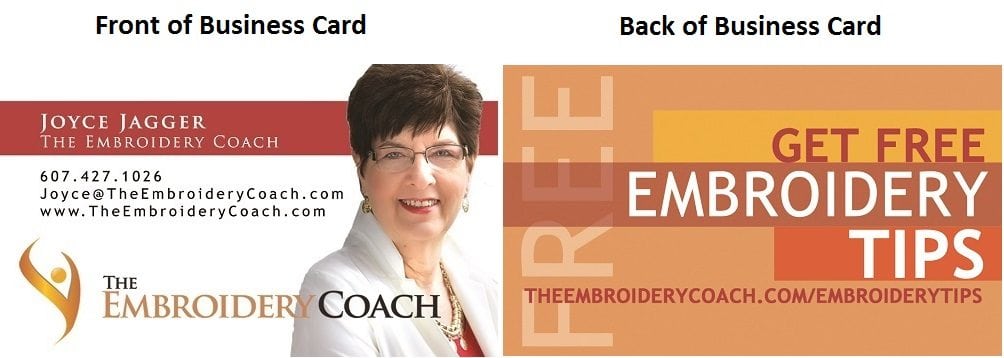
A great business card with a message will bring in new business. On the back of this card, give them a reason to shop in your place of business. On the front of your business card have the Name of your business, your company logo, your tagline, website address and your contact information. The contact information is going to depend on how you want people to shop with you. This could be your street address and phone number, it could be your email address and phone number or just your web address.
If you choose to use your web address and email address, then you want to make sure that your phone number is on your website. You need to have a way for people to talk to you personally. If you do not want to answer the phone, create a great message on voice mail with an offer and tell them that you will return their phone call as soon as possible, that you are looking forward to talking to them.
On the back of your business card, you want to give them some type of a free offer or a discounted coupon. If you want to drive traffic to your website, create a Free Report or a discounted coupon that the customer or prospect would have to sign up to receive. By doing this, you now have a way to continually market to this prospect.wit
By creating a card with an offer on it, your card will stand out and you will be remembered. I also have my business cards printed in small quantities because I like the change the offer on a steady basis. This way your cards are always fresh and new!
Add an Email Signature to all of your email messages
Many of your contacts may be unaware of what you have to offer and by adding a message to the end of your emails you can create an awareness of your current offer, a new website or Facebook page. This can be done very easily, can bring in new clients and the best part is, it does not cost you a dime! You can create several different signatures and send out your messages with the signature of your choice for a particular type of customer or client.
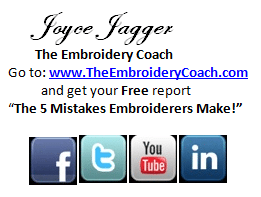
You can add images along with your text in your signature. Here is an example of one of my Signatures.
I have received several prospects and some new coaching clients as a result of the message in this signature. Your emails with the signatures can be forwarded to other people.
You never know how many times your emails get forwarded to other people or who is going to see your signature. Make it one that will work for you. They can be powerful!
 Start a Referral System
Setting up a Simple Referral Program for your Embroidery Business takes only a few minutes and it so worth it! Asking for referrals is one of the most effective, quickest and least expensive ways of gaining these new customers. Setting up a system to reward customers for referrals by giving them a discount on their next order is always effective. How do I do this? There are several ways of asking for referrals.
- Have Business cards Tucked Into Customers Pick Up Bags.
- Send Out Business Cards Or Brochures With Invoices.
- Ask For A Referral After Customer Has Placed Their Order.
- Tell everyone that you know about your Referral Program including your employees.
Have Business Cards Tucked Into Customers Pick Up Bags
The easiest and most effective way that I found was to always give my customers business cards and brochures. When they pick up their order, make sure to add business cards or brochures to their package. Ask them to write their names on the back of the cards or brochures and hand them to their friends, family and acquaintances. When the person comes into the shop that has been referred, take their business card and keep track of the person that referred them to you. The person that gave the referral would then get a discount on their next order. Everyone wants to get something for giving out your name. As I said there is a small cost to it, but this is a customer that you did not have to go after.
Keeping Track of the Referrers
I set up a simple spreadsheet for my Referral program. On that spreadsheet, I put the Date, Customers Name, Name of Referrer, Amount of Sale, Date Referrer Purchased after Referring and Amount of Referrer‚’s Sale. This helps me to keep track of the amount of sales that are brought in by the Referrers and who the Referrers are. You can increase your reward for those that give you a lot of referrals. This is the best type of Salespeople that you can have!
Tell everyone that you know about your Referral Program including your employees. This is a simple way to set up a Referral program for your Embroidery Business that WORKS. Click on the link below for more information.
Simple Referral System ProgramIf you will follow these three easy ways to increase your customer base, you will be amazed at the end result!

by The Embroidery Coach | | Embroidery Business Marketing
Does your business card leave a great first impression for your embroidery business? Have you really thought about your business card and what that first impression says about you and your Embroidery business? The first impression that you leave with your new prospect or customer is extremely important and if you do not leave the right impression or a positive impression, you will not have the opportunity for another chance. What does that first impression say about you and your Embroidery Business? That first impression is the lasting impression and you want it to be the one that they will want to remember you by and tell others about you. Here are some questions that you need to answer that will help you to create a good first impression.
- Do you look like you have an Embroidery Business?
- Does your logo give an indication of what your business is about?
- Do all of your Marketing pieces flow with the same look?
- Do you advertise your product every place you go?
- Is your appearance reflective of your workmanship?
- Is your Showroom neat and organized ready for customers at all times?
When you talk to your prospect or customer that first time, you need to have a marketing piece to hand to them. Most generally, this is your business card, but it can also be a brochure or postcard. What does your marketing piece say about you? Is it leaving the kind of impression that you want to make?
When you are creating or having your marketing pieces created you need to make sure that they gook great, let the customer know exactly what it is you do and how it is going to benefit them. What do your marketing pieces say about you? Are they leaving the kind of impression that you want to make?
You Must Tell Your Prospect What To Do!
What is it you want your customer or prospect to do? You must let them know by the marketing piece that you hand them.
- Do you want them to call you?
- Do you want them to visit your website for a FREE gift or coupon?
- Do you want them to come to your place of business to receive a FREE gift, coupon or discount?
You want to make sure that your message is clear and that you are giving them a call to action. You must give them a reason to come to you! Your business card is the first item to take into consideration. What does your business card look like? Is it one that they will remember? You want your marketing pieces to be items that they will look at and say “WOW! I need to check these people out!”
Many people overlook the importance of a high-quality business card, one that will actually leave a great impression. Remember, the first impression is the lasting impression Most people will buy the cheapest business card that they can, never thinking of what an impression that is actually leaving with the new prospect. Many have a standard logo or a logo from a company that is printing them on the back of the card. Do Not Ever Do This! A cheap business card with no real thought behind it says that your business does not pay attention to detail. Bad mistake!
What Does Your Business Card Say About You?
Thank about how your Business Card is representing you and your business. Here are the important components that need to be your business card.
- Business Name
- Logo
- What you do (Your tag line)
- Address (if applicable)
- The best way to contact you (email-phone or both)
- An offer on the back (You can send them to your Facebook Fan Page or your website for a FREE offer!)
Only have 500 Business Cards printed up the first time. You may want to make a change on it. You can then make the changes and have more printed. Give it some color. Use a color that you love and one that you are going to use in all of your marketing materials including your website.
Have a coating applied to the front side. Do not put a coating on the back. You may want to write a note on it. The colors that you choose should be part of your branding process. Yes, you will make changes. You may want to change your offer or your message. I did this several times until I came up with exactly what was working the best.
I get a lot of compliments on my card. You can see that I have all of the information on the front that is important and I have an offer on the back. This has worked very well for me and has brought in many prospects. I had my business cards printed online through a company that offered overnight service. I did not choose the overnight option, but their service was excellent and fast.
You can also have a postcard created with one lead product or some type of promotion on it that you can hand out at different functions that you go to. It can really work for you. Again, make sure that you have an offer on it, one that they cannot resist! It does not have to be expensive, just something that will make them take action. If you have a post created, make sure that it is 4″ x 6″. I have learned that people do not pay as much attention to the normal-sized 3″ x 5″ postcards as they do the larger ones.
Does your business card leave a great first impression for your embroidery business? Remember, that first impression is so important and if you want the opportunity to create customers out of your new prospects you absolutely must create a great first impression!

by The Embroidery Coach | | Embroidery Business Marketing
I want to address something that came across my desk this morning. This message is from a “Marketing Expert” and he claims that this one question is the worst question you can ask. It is a message that I do not agree with at all, but I wanted to share this with you! The question that he claims is the worst question you can ask is:
“What’s your budget for this project?”
“This killer question immediately makes you a commodity provider and not a trusted partner.
People don’t ask the question to confirm whether or not the person they’re speaking to has a budget.
People ask this question so they know how much to charge. And do you know a secret?
Their “budget” is way lower than the value you should be providing. That’s because asking about the budget for the project actually reverses the decision-making process. And the worst part?
You know darn well that no matter what they say their budget is, that’s what your price will be. And your prospect knows it too.”
Wow! I do not agree with that at all. Asking your new prospect what his budget is, is a great place to start your conversation when they come to you looking for a certain item. I have found that this is especially true if they are shopping around.
I have had many people come into my shop after they had shopped someplace else and already have a quote to find out if we can match it or come up with a lower price.
If that is the case, I immediately tell them that we will probably not be able to match his previous quote because of all of the extra steps that we do to make our customers happy and satisfied. We offer only the highest quality service and in order to provide that type of service, there are certain processes that we do that are not always offered by other embroiderers. These extra steps in our processes are standard operating procedures for us and we do not skimp on them to offer a lower price.
I always ask what their budget is and I have found that in most cases, the customer appreciates it because he knows that you are willing to work with him and are looking out for his interests. That is if this is true.
Before you start your conversation, you need to have your prices set firmly in place so that it makes it easier for you to be able to talk intelligently to your customer. If you do not have firm prices, you will not show that you have confidence in what you are doing. If you do not show that you have confidence in what you are doing, your prospective customer will not have confidence in you. This is extremely important and something that you want to remember.
If you come across to your customer with confidence, he will immediately know that he is dealing with a professional.
If you have to be within his budget, then you need to show him or her options that are in a lower price range if he is all about a lower budget. You do not charge him based on what he said he is willing to pay or what his budget is.
I always gave my customer three choices of quality in products. This way he had choices in what garment he could choose to meet his budget, but we did not skimp on our quality of embroidery. Regardless of what the garment quality was, our embroidery was always top quality.
Maybe he cannot afford embroidery and needs to stick with a digital print or screen printing if that will meet his needs. Many times, a person, especially if it is for a business, can lower his garment standards but he still wants his employees to look professional.
DO NOT ever ask your customer what his budget isso that you know what your limit is for charging him. That will make you look very unprofessional and lack confidence. This is a real NO, NO!
Know your costs; know what you need for a markup, and know your prices! Have then set in stone!
by The Embroidery Coach | | Embroidery Business Marketing
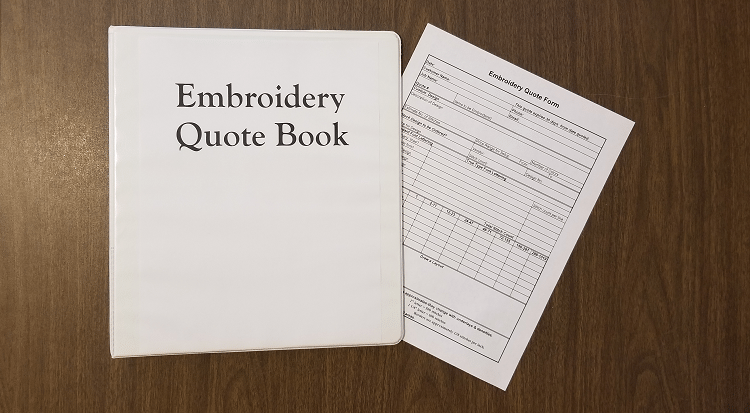
Create an Embroidery Quote Form and Quote Book for all of the quotes that you give to your customers. If you have given your customer a price quote on a design or on finished products, make sure that you write all of the information down on your form and keep it in your Quote Book. A three-ring binder works great for this. Keep the binder in the customer service area for easy retrieval when the customer actually places their order.
Make sure that you give your customer a copy of the Embroidery Quote Form to take with him. In case of an email order, phone order or fax order, make sure that your customer receives a copy for his or her records.
When the order is placed, remove the Embroidery Quote Form from the binder and attach it to the actual job order. The actual order processing will be faster and easier. Creating the final invoice will be faster as well and you will not have to worry about making an error.
Limit the amount of time your Embroidery Quote will be in effect. Make sure that you include the date on the quote form. At the bottom of the form, you can state how long your quote will be in effect. I always limit mine to 30 days. Some embroiderers limit their quotes to two weeks. Do what works for you.
I hope that you will find this tip helpful. If so, please let me know.
Make sure to join us for our Free Monthly Training, Go to https://TheEmbroideryCoach.com/Monthly-Training

by The Embroidery Coach | | Embroidery Business Marketing
The idea of starting a new embroidery business is fun and exciting but have you really thought about the business end of setting up your business? When you first think about starting your new embroidery business, you are excited because now you are going to do something that you love to do, day in and day out! The thought of this is very exciting, but before you really dive into this new embroidery business, you need to stop and think about the business end of this exciting new business! The business end or I should say the bookkeeping end, is one of the most important parts and the only part that is going to help guide you in growing your business.
For most embroiderers or those that start any type of decorating apparel business, that is the farthest thing from their mind! They only think about being able to provide a lot of people with their unique embroidered or decorated apparel products. Most embroiderers are born creators, not bookkeepers, but unfortunately, it is part of owning a business and is a very necessary part of the business that you must stay on top of.
When Should I Start Setting Up My Bookkeeping Records?
This needs to be done in the planning stages of your new embroidery business. You need to be keeping records from the very onset of creating your new embroidery business.
- How much are you spending in the preparation?
- Do you have a license and legal fees that you are paying out in the setting up of your new embroidery business?
- Are you asking an accountant for advice on setting up your business? If not, then you need to be actively looking for an accountant to help you set up your business properly right at the beginning.
Accounting Tools That I Have Found To Be Very Helpful!
I have been in the embroidery business for almost 40 years and I have used many tools and have developed many systems that made a huge difference in my business. One of the most time-saving tools that I have found was QuickBooks. I started using QuickBooks many years ago, but I have since developed my own way of using QuickBooks and have since created a program around QuickBooks for other embroiderers. This same system that I created, Embroidery Business Bookkeeping System, and have used for many years helps me to know at all times:
- Exactly how much work I have in-house.
- Which department within my embroidery business is making money.
- Exactly which department or service is not making any money and it helps me make the right decisions as to whether or not to keep that particular service or remove it from my business.
Simple Steps For Setting Up Your Business Accounting Records
- Organize all of your information
- Set Up Your Chart of Accounts
- Import all of your Vendors
- Import all of your Customers
- Add your Price List for Services
- Add your Price List for Products
- Create Classes (Optional)
With my new Embroidery Business Bookkeeping System, I show you how to create a chart of accounts that set your business up in the right departments to make it easy and you can instantly see what is happening in your business. Once your QuickBooks is set up using my system, you can save a lot of time and know where you are at all times in your business. This system will help you increase your cash flow because you can collect money faster and easier when you follow the system.
- When you receive an order, you log it into your system with Pricing and all of the information about the job.
- Once the job is completed, you can instantly create your invoice.
- You send this invoice immediately to your customer instructing him or her that their order is ready for pickup and make sure to have the right amount of cash, check or a credit card with them in order to be able to pick up their order.
- At the end of each day, you will run a report to see what jobs are still in-house.
- At the end of each week, you can create your schedule for the next week based on all jobs that are still in-house.
- This makes it easier to schedule all new jobs that are brought in during the next week and you will know immediately where you can add rush jobs.
Obviously, there is a lot more to this system, but these are the basic steps that will help you bring in cash a lot quicker and with less hassle. Following this system, makes accounting a lot easier, and saves a lot of time, especially if you are a small home-based embroiderer and are doing all of the jobs yourself.
I have found that the easiest version of invoicing software for me is QuickBooks Online. I love the fact that it is always updated and I do not have to worry about my invoices getting to my customer on time. I can check on a job even when I am in the field because it is online and not on my desktop.
Check out my system, Embroidery Business Bookkeeping System today! You will be so glad that you did!